


Explore Our Insights
Enea’s experts are regularly publishing new articles, blog posts, white papers, webinars, and more. Use the filters!

Easy to use
Supporting all Wi-Fi business models
Our next-generation Captive Portal Management supports all kinds of access methods including an icon-based survey functionality that is ideal for onboarding users with Smartphones. Learn more under the next-gen survey tab below.
Don’t miss to explore Enea Aptilo Wi-Fi SMP and all its functions.
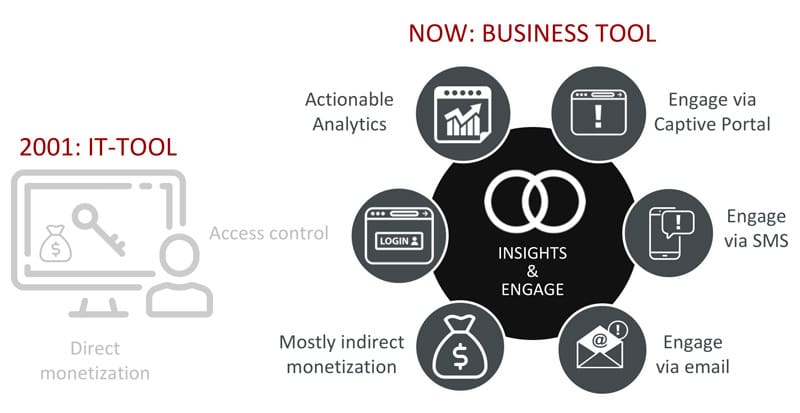
In 2001 when we founded Aptilo, the captive portal and Wi-Fi service management were tools for the IT department. Our captive portals blocked Internet access so that customers could be charged before getting online.
All that has changed; Sure, the login page is still there. But, now, it is primarily a business tool. It’s all about getting insights about your guests and better engaging with them online. Over time Wi-Fi monetization has gone from being direct to indirect.
A captive portal is a web page that users must view and interact with before accessing the Internet. What triggers a redirect to the captive portal from the access gateway can vary:
We use the latest web technology and flexible REST-based APIs towards the Aptilo Service Management Platform™ (SMP) core functions. This ensures a future-proof solution. Our Wi-Fi captive portal framework supports the complex user journey flows required for a first-class Wi-Fi service.
The captive portal in Aptilo SMP works hand-in-hand with our portal management tool. We have moved the complexity and web development code into captive portal templates. Only the objects and texts defined as editable are available in the admin interface. This allows anyone, even someone with no web development skills, to administrate the captive portal.
Learn more in the portal management section of this page.
The new (September 2020) Internet Engineering Task Force (IETF) Captive Portal API (RFC8908 and RFC8910) is very promising.
The Captive Portal API will not only improve the user experience in connection with traditional Captive Portal implementations. We believe that the Captive Portal API – in combination with Passpoint R1 – has the potential to deliver much of the user experience that Passpoint R2 and R3 were designed to accomplish.
The adoption of Captive Portal API among handset manufacturers has also been fast. Google was first to support the Captive Portal API for Android 11, and Apple soon followed with support in iOS14 and macOS Big Sur. With a critical mass of supporting devices, adoption across all the major operating systems appears imminent.
The Captive Portal API gives service management platforms, such as the Enea Aptilo Service Management Platform™ (SMP), greater control of the Captive Portal flows for traditional hotspots. As a result, users will experience a more reliable service than ever before.
The overall user experience will also benefit hugely from the Captive Portal API. We have traditionally designed Access Gateways to intercept the user web request and redirect it to a Captive Portal.
With the Captive Portal API, the gateway does not need to intercept such requests. Instead, when users join the Wi-Fi network and receive an IP address via DHCP (or Router Advertisement in IPv6), the DHCP server also provides the URL to the Captive Portal API. This will trigger the device to query the API to determine whether it is in captive mode.
If the API states the device is in captive mode, the device will open the Captive Network Assistant (CNA) browser to log in. And, if the API states the device is not in captive mode, the device will proceed directly to the Internet.
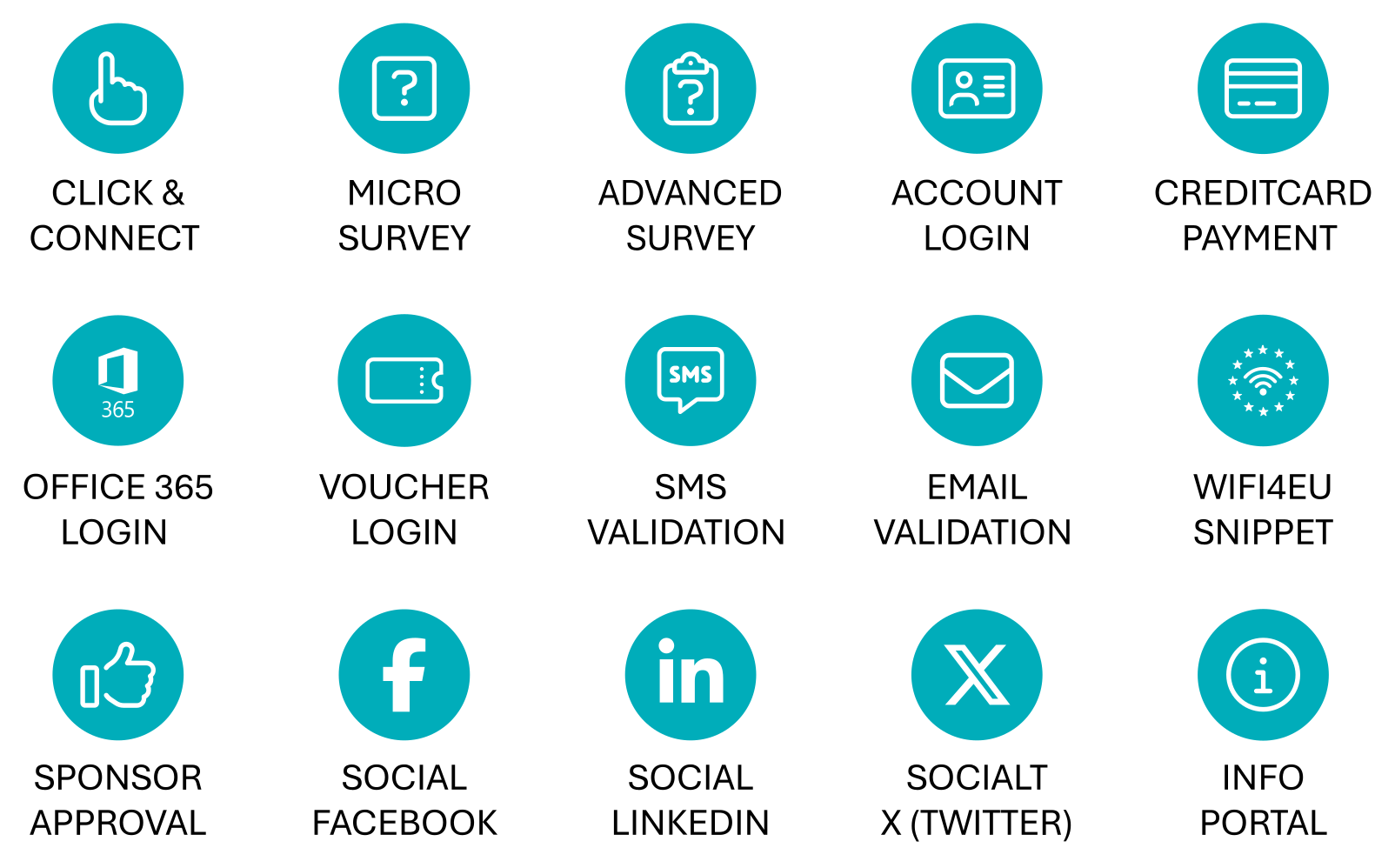
An essential part of the end-user experience is the login process. Enea Aptilo SMP provides access to the Wi-Fi service both seamlessly and through captive portals. We doubt there is a single login method or business model we haven’t already delivered in our 100+ carrier Wi-Fi deployments.
Authentication and payment methods in Enea Aptilo SMP include:
Have you ever tried to connect to a Wi-Fi hotspot running with your Smartphone in one hand and your bag in the other? Then you will love our survey functionality!
We have done a mobile-first design for the survey access method so that users can answer questions by clicking on icons — something you can do with just one hand.
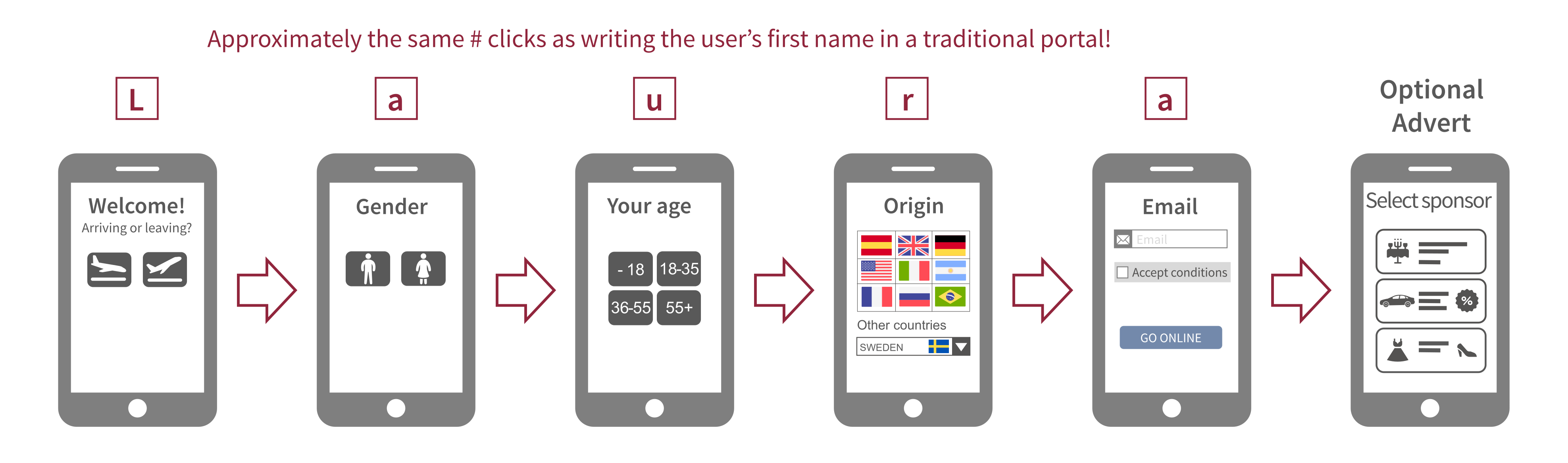
The old school says you should design captive portals with a single page and no scrolling. The survey functionality in Enea Aptilo SMP enables a different approach that goes contrary to this old truth.
The new approach is to split the steps needed to get online into several screens. The user clicks on one icon per page, swiftly moving on to the next. One of our customers reached 15% more users completing the login process just overnight using this approach instead of the traditional. Since the survey supports Wi-Fi Marketing with banner adverts, this meant 15% more revenue for them.
Going through the six screens may be as many clicks as just writing the user’s first name, so compared to the previous design, it is much easier. Auto-completion in most browsers will also automatically fill in details such as the user’s name and e-mail.
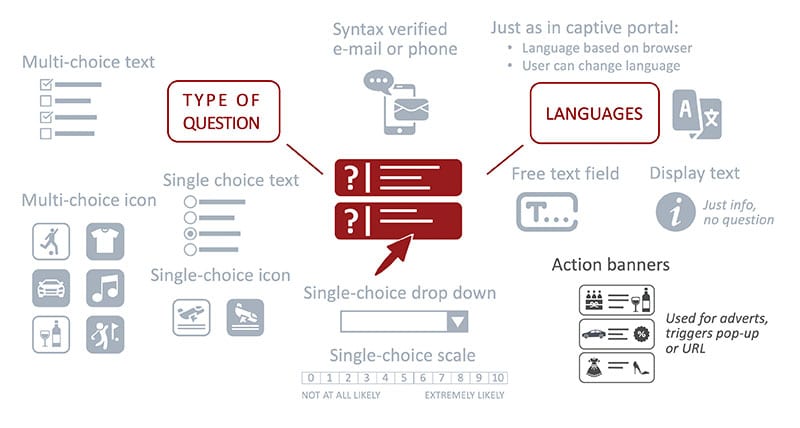
A question can be marked as mandatory. It is also possible to apply languages to each question. The icons are files in standard graphical formats that can be uploaded to the corresponding answer.
For the multi- and single-choice questions, it is also possible to add a free-text question to cover answers not represented in the choices. This question can be free text or a dropdown. This feature can be used in a very flexible way. For instance, you can cover the six most common countries with flag symbols and use a dropdown covering all other countries.
Questions can be reused in multiple surveys as a survey is simply a chain of several questions in a specific order.
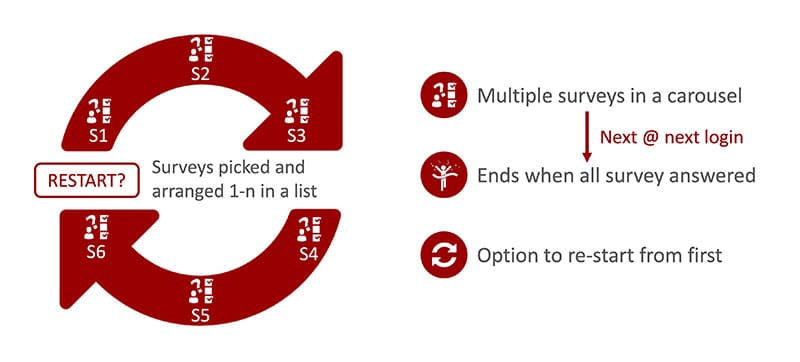
Most users understand they must give away something to get a free Wi-Fi service. So they will gladly fill in the survey if it is short enough, and they don’t have to fill it in again the next time they access your Wi-Fi service.
Our survey carousel elegantly addresses both these issues. You can add as many surveys as you like in the order you want so that the user never has to experience the same survey twice. This way, you don’t have to be eager and can keep each survey as short as possible, getting a little bit of information each time. When the last survey in the carousel has been used, the user must choose a different access method, or you can optionally choose to restart the survey carousel again.
A survey is an excellent tool to get valuable information from users. Don’t forget that privacy matters and that there are robust laws, e.g., the European GDPR, around the handling of personal data. We suggest you always use our consent & personal data management functions combined with surveys.
We have a dedicated database for survey data, and sharing the data with your external third-party systems is also possible.
Most people associate a captive portal with the graphical look and feel. But, what’s equally important for the end-result is the business logic underneath. And, this is where the award-winning Enea Aptilo Service Management Platform™ (SMP) shines.
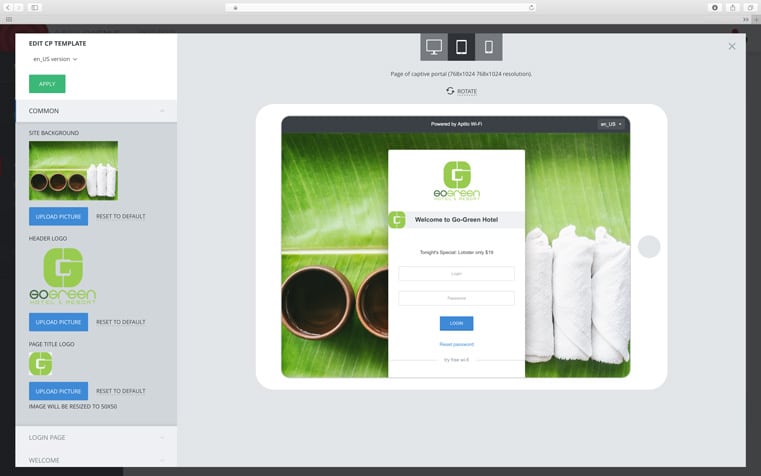
We have a different approach. Only the objects and texts defined as editable in the template are available in the simplified admin GUI. This brings several advantages:
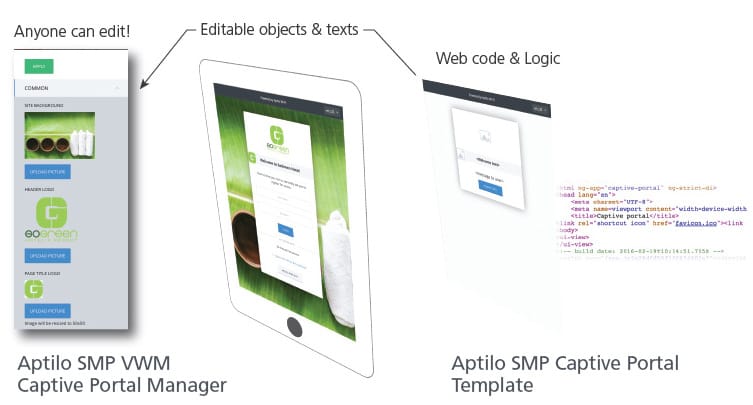
Anyone can replace an existing picture or text. Only a selected few can design a portal from scratch in a CMS system. No matter how user-friendly it is. Our captive portal management GUI is designed so anyone can modify the portal. The administrator needs zero knowledge about web page design. This means that business customers can administrate the portals themselves. For instance, a hotel restaurant manager can easily advertise “the special of the day” in the restaurant.
Administrators at each business customer can define sub-administrators at and below their position in the zone tree. Changes in the portals can be delegated down to a single location.
If no captive portal definition exists, the closest captive portal definition up in the hierarchy of locations is used.
Both the admin GUI and the templates support multiple languages. Additional languages can be easily added at any time.
Our captive portal templates are always “mobile-first” because smartphone designs are more challenging. Above all, these types of devices are also most common at venues. All portals are adaptive to larger screens.
The captive portal management GUI will be just right for businesses who want to create their own announcements or adverts. They can also use the ability to schedule activation of a portal change at a specific time. This feature is ideal for, e.g., stadiums with different events throughout the year.
Our Wi-Fi marketing features go way beyond updating a captive portal. Use our built-in banner management or integrate with advertising networks. It is also possible to send e-mails or SMS to users based on their location.
Let Enea’s experts guide you in the evolution of telecom and network communication. We regularly create and publish new content in channels customized to your interests.
Enea’s experts are regularly publishing new articles, blog posts, white papers, webinars, and more. Use the filters!
Subscribe to receive the latest insights directly into your inbox – you choose the topics.
Follow our dedicated channel for telecom operators, where Enea’s experts regularly publish news and insights.