



Wi-Fi Marketing
Engage users via banners, surveys, pop-up ads, SMS, and e-mail.
Because Privacy Matters
GDPR Compliant Wi-Fi Marketing
With the award-winning Enea Aptilo Service Management Platform (SMP), you will not only get tools for Wi-Fi Marketing. With our consent and personal data management features, your Wi-Fi service will get privacy-protected Wi-Fi Marketing compliant with GDPR.
Don’t miss to explore Enea Aptilo Wi-Fi SMP and all its functions.
Why Wi-Fi Marketing?
Wi-Fi services coupled with demographic data are very attractive for high-value targeted advertising. With Aptilo SMP, it is possible to integrate with professional advertising networks such as Google Adwords and your or your customers’ campaign systems.
Learn more details about the Enea Aptilo SMP marketing features in the sections below. And, don’t miss to check out our Survey functionality as an excellent tool to get user insights in exchange for free Wi-Fi. With our upcoming SmartAds, you will get the perfect tool to sell high-value advertising space by serving hyper-targeted Wi-Fi marketing assets tailored to each user.
The Enea Aptilo Wi-Fi SMP base offering features local banner images that can be uploaded to the Captive Portal.
The optional Wi-Fi Marketing package takes the ability to communicate with users to a whole new level by adding support for:
- Video ads: Banners can also be in the form of videos hosted on an external file server.
- Central banner & pop-up ad repository: Centrally managed asset repository.
- Banner carousels: Multiple images or videos rotated through a banner carousel at a certain time interval.
- Pop-up ads: Pop-up ads (image or video) as an overlay over the login area with a count down.
- Redirect to an external page: Users can be redirected to an external page when clicking on a banner or pop-up ad.
Banners for Wi-Fi Marketing
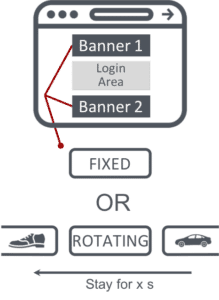
There are two banner areas on the login page. One top banner is above the login area, and one bottom banner is below. Any or both of these banner areas can be used for a single banner or a banner carousel. You can also use these banners in our Survey functionality.
Banner Carousel
Banners included in a carousel will show up at a configurable time before rotating to the next. Banners with different action-on-click (see below) can be mixed in the same carousel, but it is not possible to mix image and video ads.
Local Picture or Banner Repository
It is possible to either upload a picture to the local Captive Portal or have it provisioned from the central banner asset repository. There are several advantages to using the central repository, which will be explained in the Central Banner Repository section. A banner picture defined in a carousel will also be available as a standalone banner in the central banner asset repository.
Action-on-Click
Users can be redirected to a specific external web page URL or get a pop-up with the marketing message when they click on a banner. Note: When using a redirect URL and the user doesn’t yet have internet access (at the login page), the URL must be allow-listed in the gateway.
Pop-up Ads for Wi-Fi Marketing
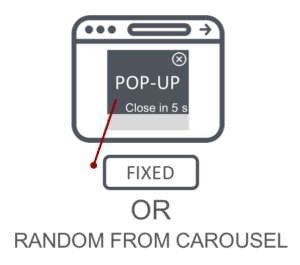 Pop-up ads allow for presenting advertisements (images or videos) as an overlay on the captive portal, blocking access to all functionality until the advertisement is closed. The advertisement can be closed automatically after a configurable time, or the end-user can close it manually. The close button can be hidden from the user, so they must wait until it is automatically closed.
The “action on click” is the same as described above for banners; users are either redirected to an external web page or will get a pop-up with the marketing message.
Similar to banners, a pop-up ad can grab the image displayed from a locally uploaded picture or the central banner asset repository with one important difference. If a banner carousel is selected as an asset, there will be no banners rotating. Instead, one banner will show, randomly selected among the banners defined in the carousel. This is an excellent way to display ads from multiple advertisers over time evenly.
Central Banner Repository
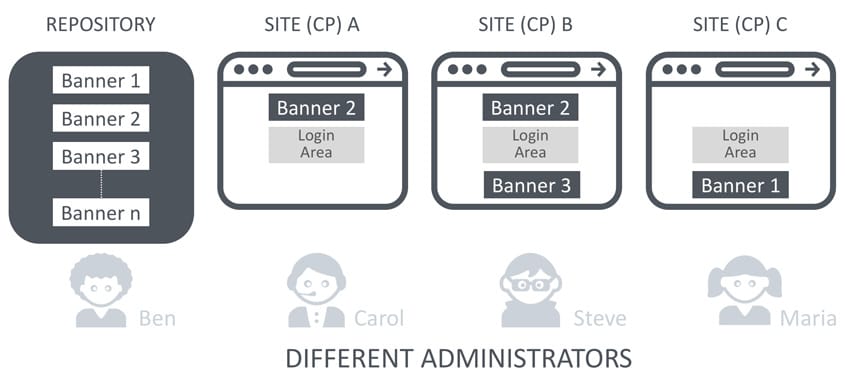
With our central banner repository, you can create banner assets and place them in one place. One or more captive portals can then use the same banner asset:
Easy to update banners across many portals
Banners can be reused across multiple captive portal instances, making it easier to update the banners across a large set of captive portals. A change in the central banner will immediately be executed on all portals using that banner. This reduces the time spent when updating banners.
Possible to have dedicated banner administrators
Banner management can be designated to a separate administrator who cannot touch the rest of the configuration. This reduces the risk that a banner administrator disturbs the service.
The Wi-Fi Marketing package includes support for event-triggered messages. One of the many use cases is to send a message to a user arriving at a location. A specific dwell time can be set to avoid triggering messages to users just passing by. This is especially useful when a user is automatically authenticated through a MAC authentication or an EAP-based authentication. A message can also be triggered as part of the email/SMS one-time password sign-up process.
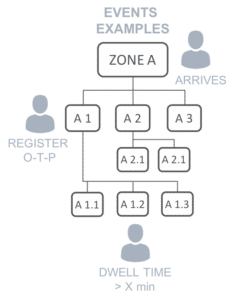
- Set per zone in the tree, valid further down: Messages are set per location in the zone tree and are valid for all locations further down in the zone tree.
- Message to the user when an “event” occurs: A message can be crafted by the marketing administrator and automatically triggered to be sent to the end-user when an “event” occurs. Events that currently can trigger a message:
- A user arrives at a location (zone). A Zone can be defined as any number of APs down to a single AP.
- User arrives at a location with more than x minutes of dwell time.
- User has registered for a one-time password.
- Message delivered via e-mail or SMS: The message can be sent to the user via SMS or e-mail. Messages will automatically be separated into several SMSs if the text exceeds the max limit/SMS.
- Optional time range: It is possible to set a validity time for the event-triggered message so that this function is just active within this time interval.
- Message frequency: It is also possible to set the frequency of how often a user should receive the message. It can be set to Once, Monthly, Weekly, Daily, Hourly, and Every time.
The Group Messaging function is a way to communicate with users who have been at a specific location at a particular time. This can (for example) be used to send an invite to take part in a user survey, an advertisement for future similar events, a special offer or an apology for temporarily poor service, etc.
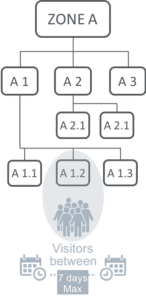
- Set per zone in the tree, valid further down: Messages are set per location in the zone tree and are valid for all locations further down in the tree.
- Message to a group of users: A message, via SMS or email, is sent to all users who have visited the specified zone or anywhere in the tree below, sometime during a specific time. It is also possible to only include active users. This option should always be used within the European Union for GDPR compliance as only consenting users will be active.
- Message via email or SMS: The message can be arranged to be sent to the user via email or SMS. Long messages will automatically be separated into several SMSs if the text exceeds the max limit/SMS.