



Wi-Fi Subscriber Management
Optimized for the Wi-Fi use case through 100+ deployments
Subscriber Management & Provisioning
All You Need to Handle Wi-Fi Subscribers
The Wi-Fi subscriber management function in Enea Aptilo Service Management Platform™ (SMP) provides the administration and provisioning of user accounts.
We are also experts in subscriber management for cellular networks. Learn more about our network data layer functionality and data management applications.
Don’t miss to explore Enea Aptilo Wi-Fi SMP and all its functions.
We have designed our Wi-Fi subscriber management function to serve large-scale deployments where accounts can reside either in the built-in or external databases.
The Wi-Fi subscriber management function features voucher management, end-user self-provisioning, and specific support for wholesale of Wi-Fi services.
With the Wi-Fi subscriber management, you can:
- View and manually create, modify and delete user accounts online
- Generate multiple accounts and vouchers using naming conventions
- Batch import and export multiple user accounts using CSV files
- A flexible search of user data based on value, key, or both using wildcards
- Refund credit card transactions
- Set e-mail notifications for users for account expiry
The Aptilo system supports authentication look-up from external sources based on Active Directory, LDAP, SOAP/XML, RSA SecurID, RADIUS, and Diameter.
Hierarchical accounts
The Aptilo hierarchical account structure allows a whole family to share the same primary account while still having individual devices as sub-accounts.
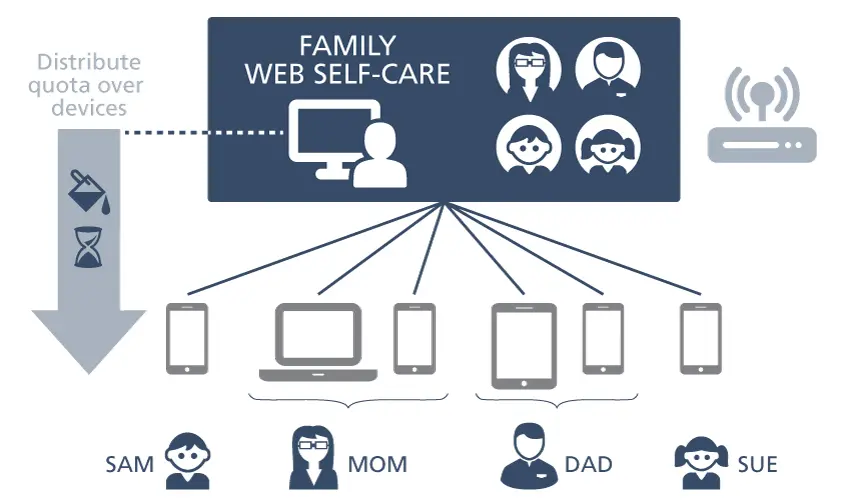
The administrator of the primary account can add and delete all sub-accounts under the primary account through a web-self care portal.
The quota for time and data set for the primary account can be distributed over the sub-accounts, e.g., devices. In this example, the family may have 200 GB per month and select how much data each device should get. There can also be different ratings applied for different sub-accounts.
The hierarchical account structure is very flexible. There are many applications for which hierarchical accounts are an ideal solution. These are the most common examples:
- Multiple devices per subscriber sharing the same quota
- Add a MAC-based account for some time for seamless access (remember me function)
- Hundreds of people at an event sharing the same voucher account.
Voucher Management
The service provider can create vouchers with the optional voucher management module, including access codes and serial numbers associated with a pre-defined account type in the Aptilo SMP.
Physical voucher cards are handy, e.g., to top up an existing prepaid account or during a service launch (promotion).
The voucher management module supports:
- E-vouchers with one-time access codes.
- Batch generation of vouchers, including access codes and serial numbers, can be used for external physical voucher creation.
- Import/export voucher codes from/to other systems with CSV files.
- Batch creation of multiple physical vouchers in PDF format.
- Wholesale support; the wholesale operator can virtually supply multiple service providers with their own voucher generator, allowing them to sell wireless access under their brand.
We have focused on making user provisioning as automated as possible by letting the end-users handle their accounts. We also support the old-school provisioning through a GUI or batch imports.
End-User Self Provisioning
End-users can sign-up for service and view and edit certain parts of the account information, e.g., view last payments and prior sessions online through a web self-care portal.
Account Activation
The optional account activation module allows the service provider to create inactive accounts for an existing customer base. Users will identify themselves and activate their accounts by sending an SMS or typing in a pre-defined username/password.
If the received credentials are correct, the account will automatically activate, and the user gets access to the service.
When using SMS as the authentication mechanism, the mobile number is stored along with the account information. This provides unique information about the end-user for later validation if needed.
Multi-tenancy support
The Aptilo SMP is built for multi-tenancy. Service providers can run multiple B2B customers from the same scalable platform. They can also allow these customers to provision their own user accounts.
This multi-tenancy functionality is one of the core building blocks in the Aptilo SMP Venue Wi-Fi Manager™. It also makes the Aptilo Guest Wi-Fi Cloud™ service reseller friendly. Resellers can sign-up for one master account and then handle all their business customers in a hierarchical fashion under their own master account.
The Self-account Management function provides a web portal that allows the service provider to provide a service to their end-users to manage their own accounts and service settings. The portal can be configured to be accessed from the Internet or the Wi-Fi service’s location.
The end user can login with the login methods that have been enabled by the service administrator and can reuse the same login methods and credentials that he/she used when registering for the service.
It is required that the end-user has a valid account with the service provider, registered with one of the below login methods, to be able to login and manage the account(s).
The following login methods are supported:
- Email login
- SMS login
- Username & Password
Since we get the user’s email from the social media login methods (Facebook, LinkedIn, Twitter), users can log in to their self account management using the email address registered on the social media platform.
The users can then edit their own personal data and also opt-out, i.e. delete their account with all personal data.
This function allows the end-users to log in and manage their consents, according to legislation such as GDPR, by viewing what consents they are opted-in for and opt-out from. The end-user can enable or disable these consents for his/her service profile.
The end-user can log in and edit/correct their personal data. The end-user can also export his/her personal data from the Self-Account Management portal. This will allow the end-user to get a file with all the information that is related to his/her personal data.